October 2026 Client Update
This month: Why AI trials fizzle out, the fraud that doesn’t need a ‘hacker’, and how one business ditched the VPN for good.
In this issue
- Editor’s Note: the security problems we saw last month weren’t all that clever
- The AI Pulse: why most AI projects never make it past the experiment stage
- In the Real World: supplier impersonation is getting better and more lucrative
- Client Story: no VPN, no server? No worries
- What’s New at Revolution
- Ask RevIT: is it OK for reception to share one login?
Editor’s Note
Welcome to the first Revolution Client Update!
This is a short monthly read for anyone who runs a business, a practice, or an office – or just for people curious about the IT they are using every day. Each month we’ll try to cover:
- The latest cyber scams doing the rounds and how to spot them,
- A practical way to save time with AI,
- Quick Tips you can put in place straight away that will make a real difference.
- We’ll also look at some successful stories from our clients which may help inspire your own IT success in your day-to-day.
- An Ask RevIT section where questions you submit can win you our monthly tech prize.
So… on to our thoughts for this month:
The security problems we saw last month really weren’t all that clever
There were quite a few cybersecurity alerts that came our way from clients during September. We would say there has been a noticeable uptick in alerts over the last few months. But what stood out was that none of the problems we dealt with were actually that sophisticated. In one healthcare business, a server was compromised because someone opened an attachment in what looked like a normal email from a trusted referrer. The attachment downloaded some remote-control software and within a couple of minutes the attacker had access to the computer. Our tools swiftly clamped down on the hack, but it just goes to show that even in 2026, those classic phishing emails are still working.
In another case, one of our own suppliers alerted us that someone out there was impersonating them using a Gmail address and was contacting all their clients in the owner’s name and asking for payment. Such a simple scam to carry out.
Neither of these needed a hacker in a hoodie in a dark room with matrix text flowing down the screen. The hacks these days come as a result of people being busy and trusting an email that looked pretty much right.
That’s not a criticism of anyone. We are all so busy these days, so carefully inspecting every email that comes your way can seem like just another job in a long list of jobs that need to get done today. This is why the most useful protection is sometimes a little bit of training/awareness, which is then backed up by your cybersecurity software. One of this month’s Quick Tips is a little security rule, and it takes about five minutes to set it up with your team.
Also in this issue you’ll meet Bruno, who joined us in September as our first AI Engineer. And no, Bruno himself isn’t AI, he’s real! The AI Pulse will be a regular feature of these Monthly Updates, and his first piece is a frank look at why so many businesses’ AI trials just fizzle out. There is so much FOMO with AI out there at the moment and Bruno is now our go-to-guy for helping turn all the AI hype into something practical and useful. He has already helped a couple of clients with getting AI working on their systems safely and is helping another with sorting out a major automation headache – so we’re excited to see what’s next for Bruno.
If something in this month’s news sparks a question for you, just flick me an email. The best questions will end up in Ask RevIT next month.
Cheers,
Barry (barry@rvn.co.nz)
The AI Pulse with Bruno
Why most AI projects never make it past the experiment stage
Welcome to the first AI Pulse – our monthly AI update where you can keep your finger on the pulse of what’s happening in the world of AI.
Hi, I’m Bruno, Revolution’s first ever Engineer specialising in AI.
I joined the team in September 2026, bringing more than 20 years in IT across banking, aviation, energy, telecommunications and the public sector. My job is to help our clients find where AI can make a real difference, and to put it in place safely, with actual people staying in control of important decisions.
Many of my conversations with businesses start the same way:
“We tried AI for a few weeks. It looked great in the demo, but hardly anyone uses it now.”
If that sounds familiar, you’re not alone. Most AI projects stall at the experiment stage. In this first column, I want to look at why that happens, using the place most businesses start: the Inbox and the Calendar.
Experimenting isn’t the same as implementing
Experimenting with AI usually looks like this: a few people get access, try some clever prompts, share an impressive result, then they drift back to old habits.

Implementing AI means it becomes part of how a specific task gets done, every day, by the people who do that task.
Projects tend to stall for a few common reasons:
- No clear problem. “Let’s try AI” isn’t a goal. “Spend less time sorting email” is.
- No connection to the real working day. People are shown features, but not how those features fit into their own work routine.
- Uncertainty about data. If staff aren’t sure what’s safe to share with an AI tool, they tend to hold back.
- No measure of success. If nobody knows what “working” looks like, nobody can say whether it worked.
Email and scheduling are a good example: almost everyone has the problem, and the tools are often already there. Microsoft 365 Copilot works inside Outlook and Teams. Claude can also connect to Microsoft 365 and, with your permission, search your email, calendar, Teams chats and SharePoint files together. Ask it to prepare you for tomorrow’s client meetings, and it can pull the latest emails, messages and documents for each client into a one-page briefing, including open questions, pending tasks broken down by owner, and promised follow-ups. That’s 20 minutes of digging through your inbox turned into a two-minute read.

Two businesses, same tools
Here are two examples based on situations I’ve seen (with details changed).
Business A
Experimenting with AI
A professional services firm with around 15 staff. They gave everyone Copilot licences and a short introduction session.
Three months later, only a handful of people were using it, and the directors were questioning the monthly subscription fees.
Business B
Implementing AI
A similar-sized firm that started with one specific problem. The practice manager and two directors were spending the first hour of every day working through email and juggling meeting times. They picked three tasks:
- The morning catch-up. Ask AI to summarise overnight email and list what needs a reply specifically today.
- Routine replies. Let AI draft the first version of common responses. A person always reviews and sends it; nothing goes out automatically.
- Finding meeting times. Ask AI to check everyone’s calendars and suggest times, instead of long back-and-forth email chains.
They agreed a few ground rules, checked in after two weeks, and kept a rough note of the time saved. Within a month, each of them was getting back between ½ and ¾ an hour a day, and their examples made it easy for the rest of the team to follow.
The difference wasn’t the technology. Business B simply had a clear problem, a small starting group and a way to tell whether it was working.
How to get started
To move from experimenting with AI to implementing AI:
- Start with one task that annoys people. Email triage and scheduling are good candidates.
- Begin with a small group who feel that problem every day.
- Set clear ground rules. Always review AI-written content before it’s sent. Agree what information shouldn’t be shared with AI tools. Use your business AI accounts, which come with stronger data protections than free personal tools.
- Measure something simple, such as minutes saved each morning or how quickly meetings get booked.
- Share what works with your own team and use the real world examples that have just worked for you.
Key takeaways
- Most AI projects stall because there’s no clear problem to solve.
- Email and calendar management is a practical, low-risk place to start.
- AI should draft and suggest; people should review and make the decisions.
- Small, measured wins build the confidence to do more.
AI doesn’t need to be a big transformation project. The businesses getting real value started by picking one everyday problem and solving it properly.
Over the coming months, I’ll cover how to use tools like Claude and Copilot safely, and practical ways other businesses are using AI today. In the meantime, if you’re curious where AI could save time in your business, I’d be happy to chat.
Bruno (bruno@rvn.co.nz)
In the Real World
Supplier impersonation is getting better and more lucrative
In September, Whanganui District Council reported paying around $310,000 to scammers by falling for an altered invoice. It made the NZ Herald because it was a council, but the reality is the same thing happens to small businesses every week – and those stories don’t ever make the papers.
What’s changed throughout 2025/26 is that many of these scams don’t involve breaking or ‘hacking’ into anything. Last month one of our own suppliers, a small design agency, warned us that someone had set up a Gmail account in the owner’s name and was emailing the agency’s clients asking for payment through a link. Nothing at the agency had been hacked – but the scammers simply worked out who their clients were from the portfolio on their website.
That’s why this type of fraud is so effective. Your email filtering tool has nothing to catch. The email isn’t carrying a virus, it’s just asking for money from someone who looks and sounds familiar.
How it usually plays out
- They work out who you deal with. Client logos and case studies on websites, LinkedIn, or a supplier’s mailbox that has been compromised.
- They make contact. From a free email account in a real person’s name, a lookalike domain, or occasionally the supplier’s real (but hacked) mailbox.
- They create a reason to pay now. An overdue invoice, “new bank details”, or a convenient payment link.

What stops this kind of scam
- Call to confirm. Any change to bank details, or any unexpected payment request, should get a phone call to a number you already have stored (not the number in the email).
- Treat free email addresses as a red flag. A supplier invoicing you from Gmail is always worth a second look.
- Look at your own website. A client portfolio is good marketing but think about what it tells a scammer.
- Protect your own domain. Email authentication (SPF, DKIM and DMARC) makes it much harder for someone to send email that looks like it came from your exact address. It won’t stop a Gmail lookalike, which is why the ‘call to confirm’ rule above works so well.
It’s worth noting that SMB1001, the cyber security certification standard for small and medium businesses, includes having a written invoice fraud policy as one of its controls. It’s one of the cheapest controls in the whole standard, and one of the most effective.
Quick Tip
Set up a call-back rule this week
Agree on a new rule with your team: if anyone asks to change bank details or pay through a new link, someone must phone them to confirm, using a number already on file, not the one from the email. Make it clear that slowing a payment down to check it is legit is always OK. This small change will stop a very common fraud that we are seeing.
Client Story
No VPN, no server? No worries
For years, one Auckland business ran the way a lot of small businesses still do – with a main server at head office that everyone relied on, whether they were in the office, working from home or out on the road.
All their business documents lived in shared folders on that server. That was fine when staff were at their desks, but working from anywhere else meant connecting back to the office through a VPN. And the VPN had a habit of dropping out at the worst possible moment, like when you’re sitting in front of a client.
So staff got into the habit of copying presentations onto a USB stick before heading out. Forget to do that and you’d be ringing someone back at the office to email the file over. Working from home wasn’t much better.
A lot of time was being wasted just getting people to the files they needed to do their jobs. On top of that, the server was chock-full of duplicate files, it needed its own backup box sitting next to it, and both were getting older by the year.
You might think this sounds like ancient technology, but plenty of businesses still work this way. They’ve got an ageing server the owner spent good money on, and nobody has the time (or the energy!) to plan a move to the cloud.
What we changed
Over about six weeks, we moved the business fully onto Microsoft 365, which now does everything the server used to do:
- All the shared files went into SharePoint and OneDrive. We cleaned up the folder structure but kept the familiar names, so nobody had to relearn where things live.
- Every computer was set up to work cloud-first, rather than being tied to the network at head office. Files now open the same way whether you’re in the office, at home or on a client site.
- We stepped up security at the same time. Devices are now managed centrally, security policies are applied across the board, and accounts are monitored 24/7 for anything that looks like a hack in progress.
- The old server and its backup box were switched off and decommissioned.

What it’s like now
Nobody logs into a VPN just to open a file anymore. Staff sign in to their computer once and their files are there, wherever they happen to be working.
And because nobody’s working off a copy on a USB stick or one they emailed to themselves, there’s always one up-to-date version of each document, stored safely in the cloud where we have it protected and backed up.
Not only did the move significantly reduce their IT costs, it made day-to-day work a whole lot easier for the team. The old server room is now so empty that the owner’s only question is when we can come in and clear it out!
Is this right for every business? No.
This worked because this business mostly needed shared files, and their main software like Xero and their CRM already ran in the cloud. Some businesses still need a server on site. Dental and medical practices are a good example: their imaging and practice software often needs a server to run their special software. In those cases, the answer is usually a mix: a smaller, modern server for the software that needs it, and everything else in Microsoft 365.
What’s New at Revolution
News from the team

Say hello to Bruno
You’ve read his first AI Pulse article above. Bruno spends his days chatting with clients to find the jobs AI can take off their plate.
If there’s a task in your business that eats an hour a day, he wants to know about it! bruno@rvn.co.nz
The Client Portal is here
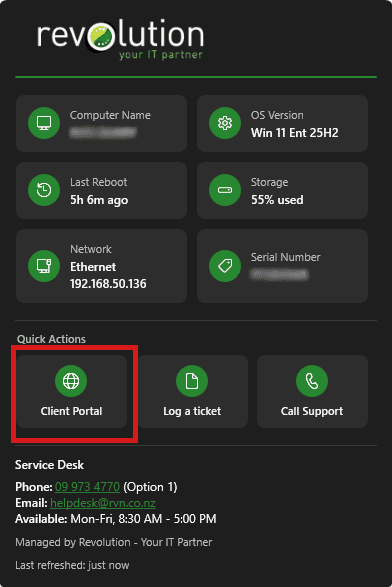
You can now log a support request, check where an existing one is up to, and see your ticket history without picking up the phone. To open it, click the Revolution icon in your taskbar.
Quick Tip
Give yourself a 10-second “oh no” button
We’ve all hit Send Email and immediately spotted the missing attachment, the typo, or the wrong “Sarah” that should have been “Sara”. Well, did you know that Outlook can hold your email back for up to 10 seconds so you can pull it back?
In Outlook, click the Settings cog → Email → Compose → Undo send, choose 10 seconds and save. Next time you hit Send, an Undo button pops up at the bottom of the screen.
Using classic Outlook? Ask us. We can set up a rule that delays sending by a minute instead.
Ask RevIT
“Is it OK for reception to share one login?”
Short answer: no, and it’s one of the easiest ways for an attacker to get inside your systems.
Here’s how it usually plays out: a reception account is set up for the one person on the front desk. Over time the business grows and a second person starts covering busy mornings, a part-timer comes on, and before long three or four people are signing in with the same password.
What happened to one clinic
Last month, a specialist clinic got an email from Microsoft saying that their reception account was being signed into from overseas. When we looked back through the sign-in records, the first overseas login had happened over a week earlier. Since they had no mandatory MFA policy, the hacker was able to log in with the username and the (breached) password.

We locked it down the minute the clinic alerted us. We signed the account out on every device and changed the password. Multi-factor authentication is now enforced for every user at the clinic, so it’s no longer optional for anyone. We’ve also been given permission by the owner to implement our cybersecurity tools which among other things prevent logging in from overseas, from non-business devices, and instantly lock out accounts where an attack is suspected.
Why shared logins cause problems
- Multi-factor authentication doesn’t really work. The code goes to one person’s phone, and that person isn’t always at work. So it tends to get switched off.
- There’s no record of who did what. If something goes wrong, every action just says “Reception”.
- It’s not how Microsoft 365 is licensed. Microsoft licenses it per person, not per desk. Every person signing in should have their own account.
The better way
Give everyone on the desk their own account and licence. Then set the reception email up as a shared mailbox, which everyone can open in their own Outlook alongside their personal inbox. Each person signs in as themselves, with their own password and multi-factor authentication, and when someone leaves the business you just remove their access.
Yes, extra licences might cost a bit more each month – but it’s a lot less than cleaning up after a hacker has been messing around in your reception inbox.
If your front desk is sharing a login, let us know and we’ll sort out the right setup.
Further Reading
From the Revolution blog
Got a question for next month’s Ask RevIT?
Email barry@rvn.co.nz. If it’s on your mind, let us know! – Someone else probably has the same question too. The person’s question that gets answered next month wins a professional Bluetooth headset which you can use for your online meetings (valued at $430)